
Ansible을 이용하여 Linux 업데이트 자동화 (9편) - 재부팅 판단과 부팅 검증 안정화에서 이어지는 글이다.
9편에서는 재부팅 필요 여부를 변수로 정리하고, 재부팅 전후 boot ID를 비교하도록 보완했다. 하지만 실제 운영에서는 특정 서버의 재부팅 작업에서 Ansible이 오랫동안 다음 단계로 넘어가지 않는 문제가 간헐적으로 남아 있었다. 2시간 넘게 기다리는 경우도 있었으며, 같은 코드로 실행해도 어떤 날은 정상적으로 끝났다.
특이한 점은 Ansible이 기다리는 동안 해당 서버에 별도의 SSH 연결을 시도하면 정상적으로 접속할 수 있었다는 것이다. 이 상황에서는 서버의 부팅 상태뿐 아니라, Ansible이 사용하던 SSH 프로세스와 원격 명령 실행 경로도 확인해야 한다.
이번 10편의 대상은 2편부터 작성해 온 playbooks/update_all.yml이다. 4편에서 추가한 조건부 자동 재부팅과 9편의 boot ID 검증을 유지하면서, SSH 연결 정체에 대응하고 재부팅, 검증 작업의 실행 시간 제한을 보강한다. 또한 특정 서버만 선택하는 --limit 실행에서도 Control node의 로그 초기화가 빠지지 않도록 수정한다.
연결 문제를 단계별로 확인하는 diagnose_connection.yml은 이번 10편에서 새로 소개하는 보조 playbook이다. 패키지 업데이트와 조건부 재부팅은 계속 update_all.yml이 담당한다.
기준 환경 및 적용 범위
이 글의 기준은 Rocky Linux 10.2 Control node에서 사용한
ansible-core 2.16.16, Python 3.12.14 환경과 2026년 11월 2일 운영 검증 결과다. 예제 경로와 호스트 별칭은 1~9편의~/ansible-lab구성을 기준으로 설명한다. 실제 운영 inventory와 로그 경로는 각자의 기존 설정을 사용하면 된다.
목차
1) 9편까지 구현한 기능과 이번에 보완할 부분
먼저 기존 기능과 이번 변경을 구분할 필요가 있다.
| 기존 글 | 구현한 내용 | 10편과의 관계 |
|---|---|---|
| 1~3편 | 계정, SSH 키, inventory 구성, OS 계열별 업데이트, check mode | 기존 실행 방법 유지 |
| 4편 | 업데이트 후 필요할 때 자동 재부팅 | 재부팅 실행 경로의 대기 제한 보강 |
| 5편 | RHEL 계열의 패키지 변경 미리보기 | 기존 미리보기 유지 |
| 6편 | before/after 패키지 스냅샷과 txt/json 보고서 | --limit에서도 로그 초기화 실행 |
| 7편 | 새 구성 파일과 기존 설정 비교, 서비스 검증 | 업데이트 후 운영 절차로 계속 사용 |
| 8편 | /var/log/ansible 아래 로그 저장과 보존 정책 | 기존 경로, 권한, 보존 정책 유지 |
| 9편 | 재부팅 판단, boot ID 비교, Play별 SSH 연결 재사용 비활성화 | 공통 SSH 설정과 작업별 timeout 추가 |
특히 9편에도 이미 ControlMaster=no, ControlPath=none, ControlPersist=no가 있었다. 따라서 이번 개선을 단순히 "ControlMaster를 껐더니 해결됐다"라고 설명하면 기존 코드와 맞지 않는다.
이번 변경의 핵심은 다음과 같다.
- SSH 설정을
inventory/group_vars/all.yml에 모아update_all.yml의 업데이트, 조건부 재부팅과 새 진단 playbook에 같은 정책을 적용한다. - 응답하지 않는 SSH 연결을 감지하도록
ServerAliveInterval과ServerAliveCountMax를 추가한다. - 연결 시간 제한과 별도로, 재부팅 action 및 짧은 검증 작업에 Task 수준
timeout을 둔다. - 로그 초기화 Play가
--limit에서 제외되지 않도록 수정한다. - SSH, sudo, Python을 분리해서 확인하는 진단 playbook을 추가한다.
2) SSH로 접속되는데 Ansible만 기다리는 이유
2-1) 새 SSH 접속 성공과 기존 작업의 정상 여부는 별개다
다음 명령으로 접속된다고 해보자.
ssh ansible@관리대상주소수동 SSH 접속에 성공했다는 것은 그 시점에 별도의 SSH 세션을 열 수 있었다는 뜻이다. SSH 연결 공유 설정에 따라 이 세션은 새 TCP 연결을 만들거나 기존 연결을 재사용할 수 있다. 어느 경우든 수동 접속 결과만으로는 먼저 실행 중이던 Ansible의 SSH 프로세스가 응답을 받고 있는지, 원격 sudo 명령이나 Python 모듈 실행이 끝났는지 알 수 없다. 기존 SSH 연결을 재사용하지 않고 비교하려면 11절의 수동 SSH 명령을 사용한다.
또한 수동 SSH에서 사용하는 짧은 호스트 이름과 inventory의 FQDN이 다르면 ~/.ssh/config의 Host 규칙이 다르게 적용될 수 있다. 접속 계정, 개인 키, 목적지 주소, sudo 사용 여부까지 맞춰야 의미 있는 비교가 된다.
따라서 "수동 SSH 접속 성공"만으로 재부팅 실패라고 판단하거나, 반대로 Ansible 문제를 전부 해결했다고 판단하기는 어렵다.
2-2) Tailscale Relay 지연만으로 원인을 단정하지 않는다
내 환경에서는 Tailscale이 DERP Relay를 경유할 때 약 160ms의 지연이 관측되었다. 이런 지연은 SSH 연결을 여러 번 만드는 작업의 전체 시간을 늘릴 수 있다. Tailscale 공식 문서도 direct 연결과 relay 연결의 성능 차이를 설명한다.
다만 약 160ms의 왕복 지연이 있다는 사실만으로 특정 재부팅 작업의 2시간 대기를 설명할 수는 없다. 연결 단절, SSH 프로세스의 응답 정체, 원격 명령 대기 등을 함께 봐야 한다. 당시 정체된 프로세스 내부 상태를 모두 수집한 것은 아니므로, 직접 원인을 하나로 확정하지 않았다.
이번 개선은 Tailscale UDP 포트포워딩이나 UPnP 활성화를 전제로 하지 않는다. 우선 Ansible이 연결 이상과 명령 실행 정체를 구분하고, 과도하게 기다리는 작업을 실패로 드러낼 수 있도록 보완하는 데 초점을 맞춘다.
2-3) reboot_timeout은 Task 전체의 강제 종료 시간이 아니다
9편 예시에는 reboot_timeout_seconds: 1200이 있었다. 이 값을 지정했다고 해서 재부팅 Task 전체가 반드시 1200초 안에 끝나는 것은 아니다.
Ansible reboot 모듈 문서는 reboot_timeout이 부팅 검증과 테스트 명령 성공 대기에 각각 적용된다고 설명한다. 두 단계에 모두 시간이 소요될 수 있다.
여기에 ansible-core 2.16.16의 reboot action 구현을 보면, 재부팅 명령을 실행하는 SSH 호출과 그 이후의 검증 루프가 구분되어 있다. 검증 루프의 제한 시간을 확인하기 전에 SSH 호출 자체가 오래 반환되지 않는 경로도 고려해야 한다. 따라서 내부 검증용 reboot_timeout에 더해 Task action의 실행 시간을 제한하는 timeout을 둔다.
이 구분이 이번 개선의 핵심이다. timeout은 reboot 모듈의 하위 옵션이 아니라, register, when과 같은 수준의 Task 키워드다.
3) SSH 연결 설정을 공통 변수로 통합
~/ansible-lab/inventory/group_vars/all.yml을 다음과 같이 작성한다.
ansible_connection: ssh
ansible_python_interpreter: /usr/bin/python3
ansible_become_method: sudo
ansible_user: ansible

# Shared by update_all.yml and inventory-based diagnostics.
# This is an SSH connection timeout, not a package-operation timeout.
ansible_ssh_timeout: 10
ansible_ssh_args: >-
  -C
  -o ControlMaster=no
  -o ControlPath=none
  -o ControlPersist=no
  -o ServerAliveInterval=15
  -o ServerAliveCountMax=3
각 설정의 역할은 다음과 같다.
| 설정 | 역할 | 해석할 때 주의할 점 |
|---|---|---|
ansible_ssh_timeout: 10 | SSH 연결 플러그인의 timeout 지정 | 패키지 설치나 원격 명령 전체를 10초로 제한하지 않음 |
ControlMaster=no | SSH multiplexing master 생성 비활성화 | ControlPath=none도 함께 적용 |
ControlPath=none | 공유 연결 소켓 사용 비활성화 | 기존 master 연결 재사용도 피하도록 설정 |
ControlPersist=no | 연결 공유용 master를 백그라운드에 유지하지 않음 | Tailscale 터널 자체를 재생성하는 설정은 아님 |
ServerAliveInterval=15 | 서버에서 데이터가 오지 않을 때 암호화된 SSH 채널로 응답 요청 | TCP keepalive와 별개의 SSH 기능 |
ServerAliveCountMax=3 | 응답 없는 요청이 누적되면 연결 종료 | 응답 없는 SSH peer를 대략 45초에 감지하는 설정 |
OpenSSH 문서에 따르면 15 × 3 설정은 서버가 응답하지 않을 때 약 45초 후 연결을 끊는 예시다. 이 시간을 모든 원격 명령의 제한 시간으로 해석하면 안 된다. SSH 서버는 정상적으로 keepalive에 응답하지만, 실행한 명령만 끝나지 않는 경우에는 이 설정만으로 해결되지 않는다. 그 경우를 위해 다음 절의 Task timeout이 필요하다.
이 정책을 적용하면 새 SSH 실행에서 공유 master 연결을 사용하지 않는다. 재부팅 검증 중 연결 실패가 반환되면 reboot action이 연결을 재설정하고 다시 시도할 수 있다. 다만 이미 실행 중인 정체된 명령을 주기적으로 무조건 종료하고 다시 실행하는 기능을 추가한 것은 아니다.
3-1) 기존 Play 안의 ansible_ssh_args도 제거해야 한다
9편에서 Debian/RHEL Play의 vars: 아래에 넣었던 다음 항목은 제거한다.
ansible_ssh_args: >-
  -C
  -o ControlMaster=no
  -o ControlPath=none
  -o ControlPersist=no
update_all.yml 안의 Debian 계열 Play와 RHEL 계열 Play 양쪽에서 이 중복 항목을 제거한다. 그 결과 업데이트 Play와 진단 playbook이 같은 공통 설정을 사용한다.
Play 변수는 inventory 그룹 변수보다 우선할 수 있다. 기존 항목을 남겨두면 공통 파일에 새로 추가한 ServerAliveInterval과 ServerAliveCountMax가 실제 SSH 명령에 반영되지 않을 수 있다. 호스트 변수나 extra vars 등에서 같은 변수를 다시 지정한 경우도 확인해야 한다.
ansible.cfg에 기존 ssh_args = -o ControlMaster=auto -o ControlPersist=60s가 있어도, 이 inventory의 ansible_ssh_args 변수가 적용되면 공통 변수 쪽 설정을 사용한다. host_key_checking = True와 기존 pipelining = True는 유지한다.
4) 재부팅과 검증에 서로 다른 시간 제한 적용
update_all.yml의 Debian/RHEL 업데이트 Play 각각에 다음 변수를 사용한다.
reboot_timeout_seconds: 900
reboot_task_timeout_seconds: 2100
verification_task_timeout_seconds: 120
connect_timeout_seconds: 10
post_reboot_delay_seconds: 30| 변수 또는 설정 | 값 | 적용 범위 |
|---|---|---|
ansible_ssh_timeout | 10초 | SSH 연결 수립 및 일부 소켓 읽기 대기. 원격 명령 전체의 실행 시간 제한은 아니다. |
connect_timeout_seconds | 10초 | reboot 모듈의 connect_timeout에 전달하는 값. 실제 OpenSSH 연결 제한은 SSH 플러그인 설정도 확인한다. |
reboot_timeout_seconds | 900초 | reboot 모듈 내부의 boot ID 변경 확인과 테스트 명령(whoami) 성공 대기에 각각 적용한다. |
reboot_task_timeout_seconds | 2100초 | 재부팅 Task 한 번의 실행 제한(35분). 모듈 내부 대기와 검증을 포함하며, 후속 Task는 포함하지 않는다. |
verification_task_timeout_seconds | 120초 | 재부팅 전후의 boot ID 조회 Task에 각각 적용한다. 원격 스냅샷 임시 파일 정리에서는 파일마다 적용한다. |
진단 Task의 timeout | 90초 | 진단 플레이북의 개별 SSH, sudo, Python, boot ID 검사 Task에 각각 적용한다. |
보고서 생성 Task의 timeout | 120초 | Control node에서 호스트 한 대의 패키지 변경 보고서를 생성하는 Task에 적용한다. |
post_reboot_delay_seconds | 30초 | 재부팅 명령 후 reboot 모듈이 내부 검증을 시작하기 전에 기다리는 고정 시간이다. |
이번 운영 설정에서 2100초를 선택한 것은 내부 대기 두 구간의 900 × 2와 추가 여유를 고려한 것이다. 매번 35분을 기다린다는 뜻은 아니다. 정상적으로 응답하면 곧바로 다음 작업으로 넘어간다. 느린 스토리지나 긴 부팅 절차가 있는 서버는 이 값을 운영 환경에 맞게 정해야 한다.
9편 예시의 1200초를 900초로 줄인 것 자체가 해결책은 아니다. 각 timeout이 어디에 적용되는지를 구분하고, 바깥쪽 Task 실행 제한을 추가한 것이 핵심이다.
4-1) 재부팅 Task 수정 예시
다음은 update_all.yml의 Debian 계열 재부팅 Task다. 기존 when 조건을 유지한다.
- name: Reboot Debian-family host if reboot is required
  ansible.builtin.reboot:
    msg: "Reboot initiated by Ansible after Debian/Ubuntu updates"
    connect_timeout: "{{ connect_timeout_seconds }}"
    reboot_timeout: "{{ reboot_timeout_seconds }}"
    post_reboot_delay: "{{ post_reboot_delay_seconds }}"
    test_command: whoami
  timeout: "{{ reboot_task_timeout_seconds | int }}"
  register: deb_reboot_result
  when: deb_reboot_required | bool
RHEL 계열도 같은 방식으로 수정하되, 결과 변수는 rhel_reboot_result, 조건은 rhel_reboot_required | bool을 사용한다. 이 Task들은 실제 적용 모드에서만 실행되는 기존 block 안에 둔다.
재부팅 전후 boot ID 조회에는 120초 제한을 추가한다.
- name: Capture Debian boot ID after reboot
  ansible.builtin.command:
    argv:
      - cat
      - /proc/sys/kernel/random/boot_id
  register: deb_boot_id_after
  timeout: "{{ verification_task_timeout_seconds | int }}"
  changed_when: false
  when: deb_reboot_required | bool
원격 스냅샷 임시 파일을 지우는 always 작업에도 같은 제한을 둔다. 정리 작업에서 SSH가 응답하지 않아 다시 오래 기다리는 상황을 줄이기 위한 것이다. loop가 있으면 이 제한은 각 항목의 action에 적용되므로, 정리 block 전체가 합계 120초라는 뜻은 아니다.
반면 APT/DNF 패키지 트랜잭션 전체에 일괄적으로 90초나 120초 제한을 걸지는 않았다. 패키지 설치, 업그레이드는 정상 상태에서도 오래 걸릴 수 있으며, 짧은 제한을 적용한 뒤 무작정 다시 실행하면 실제 진행 상태를 파악하기 어려워진다.
4-2) timeout이 발생하면 어떻게 되는가?
| 상황 | 개선판의 동작 |
|---|---|
| 새 SSH 연결이 제한 시간 안에 수립되지 않음 | 해당 연결 시도는 실패한다. reboot의 내부 검증 중이라면 제한 시간 안에서 연결을 다시 시도한다. |
SSH 서버가 ServerAlive 요청에 응답하지 않음 | ServerAliveInterval=15, ServerAliveCountMax=3 설정에 따라 약 45초 후 SSH 클라이언트가 해당 연결을 종료한다. |
| SSH 연결은 유지되지만 재부팅 Task가 끝나지 않음 | 바깥쪽 Task의 timeout: 2100에 도달하면 Ansible이 해당 action을 중단하고 Task를 실패로 처리한다. |
reboot 내부 검증에서 boot ID가 계속 이전 값과 같음 | reboot가 boot ID 변경을 다시 확인한다. 내부 검증 제한인 900초가 만료되거나 바깥쪽 Task 제한에 먼저 도달하면 재부팅 Task가 실패한다. 이 경우 후속 boot ID 조회와 assert는 실행되지 않는다. |
reboot는 성공했지만, 플레이북의 별도 boot ID 조회가 끝나지 않음 | 재부팅 후 boot ID를 읽는 조회 Task가 120초 제한으로 실패한다. 비교할 값을 얻지 못했으므로 후속 assert는 실행되지 않는다. |
| 전후 boot ID 조회가 모두 성공했지만 두 값이 같음 | 플레이북의 후속 assert가 실패한다. |
reboot가 내부 검증 중에 다시 시도하는 것은 SSH 재접속과 부팅 상태 확인이다. 이 플레이북은 검증에 실패해도 재부팅 명령을 자동으로 다시 보내지 않는다. 재부팅 Task가 실패로 표시되더라도 서버는 이미 재부팅되었을 수 있으므로, 다시 실행하기 전에 현재 boot ID와 부팅 로그를 확인한다.
또한 Ansible의 Task timeout은 action 실행에 대한 제한이다. 템플릿 평가, loop 전체, 실패 후 별도 정리 작업까지 포함한 playbook 전체의 정확한 종료 시각을 보장하는 값은 아니다. 원격에서 이미 시작된 작업의 취소나 패키지 롤백도 보장하지 않는다.
실패 이후에는 서버의 실제 부팅 상태와 로그를 확인하고 다시 실행할 범위를 결정한다. 업데이트 Play에는 any_errors_fatal: true를 두었다. 재부팅과 boot ID 검증의 실패를 정상 완료로 넘기는 ignore_errors 설정은 사용하지 않는다.
5) --limit에서 로그 초기화가 빠지는 구조 수정
이번 개선에는 SSH 대기 문제와 별개로 확인한 실행 범위 문제도 포함된다.
5-1) 기존 hosts: localhost 초기화 Play의 문제
6편부터 업데이트 전에 Control node에서 로그 디렉터리를 만드는 Play가 있었다.
- name: Initialize package change logging on control node
  hosts: localhost
  connection: local
  gather_facts: false
그런데 다음처럼 실행하면 --limit은 localhost 초기화 Play에도 적용된다.
ansible-playbook playbooks/update_all.yml --limit 'debian13'localhost가 선택 범위에 없으므로 초기화가 실행되지 않고, 뒤에서 참조하는 hostvars['localhost'].pkg_change_log_root_dir 같은 변수가 준비되지 않을 수 있다. 경로 변수를 default('')로 감추면 /snapshots, /reports처럼 의도하지 않은 경로로 이어질 여지도 있다.
9편에서 소개했던 단일 호스트, 그룹 --limit 실행은 이 선행 초기화까지 함께 고려해야 한다. 단순히 사용자가 명령어를 잘못 입력한 문제가 아니라, playbook 구조를 보완해야 하는 부분이었다.
5-2) 선택된 호스트를 기준으로 시작하고, 실제 초기화는 localhost에 위임
초기화 Play의 대상은 다음과 같이 변경한다.
- name: Initialize package change logging on control node
  hosts: debian_family:rhel_family
  order: sorted
  strategy: linear
  any_errors_fatal: true
  become: false
gather_facts: falsedebian_family:rhel_family는 두 그룹의 합집합이다. 이 중 --limit에 선택된 호스트가 있으면 초기화 Play도 실행된다.
그 안의 초기화 block에는 다음 설정을 둔다.
delegate_to: localhost
run_once: true
become: false
vars:
  ansible_connection: local
  ansible_python_interpreter: "{{ ansible_playbook_python }}"
이렇게 하면 선택된 Managed node를 기준으로 Play는 시작하지만, 실제 로그 디렉터리 준비는 Control node에서 한 번 수행한다. 초기화 Play에는 serial을 두지 않았다. run_once는 serial과 함께 사용하면 배치별로 실행될 수 있기 때문이다.
공유 로그 경로를 설정하는 set_fact에는 delegate_facts: true를 추가한다.
- name: Set package change log run variables
  ansible.builtin.set_fact:
    pkg_change_log_root_dir: "{{ pkg_change_log_root_dir_tmp.path }}"
    pkg_change_log_run_id: "{{ pkg_change_log_root_dir_tmp.path | basename }}"
    pkg_compare_script: "{{ pkg_compare_script_path }}"
  delegate_facts: true
  when: not ansible_check_mode
이 Task는 앞의 delegate_to: localhost block 내부에 둔다. 그래야 결과 fact를 첫 번째 Managed node가 아니라 localhost에 저장하고, 뒤의 Debian/RHEL Play에서 같은 로그 경로를 사용할 수 있다.
이 과정은 Control node 자신의 패키지를 업데이트하거나 Control node용 패키지 보고서를 만드는 작업이 아니다. 선택된 Managed node들의 보고서를 저장할 공간을 준비하는 작업이다. 따라서 Control node를 업데이트 대상으로 inventory에 추가하거나 --limit에 localhost를 함께 쓸 필요가 없다.
5-3) 초기화 누락은 조기에 실패시킨다
각 업데이트 Play의 pre_tasks에 다음 검증을 둔다.
- name: Require controller logging initialization before package changes
  ansible.builtin.assert:
    that:
      - hostvars['localhost'].pkg_change_log_root_dir is defined
      - hostvars['localhost'].pkg_compare_script is defined
    fail_msg: "Controller log initialization was skipped. Run the playbook from its beginning; do not skip initialization with --start-at-task."
  when: not ansible_check_mode
경로 참조의 불필요한 default('')도 제거한다. 초기화가 빠지면 빈 경로로 계속 진행하는 대신, 원인을 드러내도록 한 것이다.
마지막 Play는 두 OS 그룹을 대상으로 하며, 경로를 출력하는 Task는 run_once: true로 한 번만 실행한다. 실제 경로 출력은 일반 실행일 때다. 그러면 단일 호스트만 업데이트해도 저장 경로를 볼 수 있다.
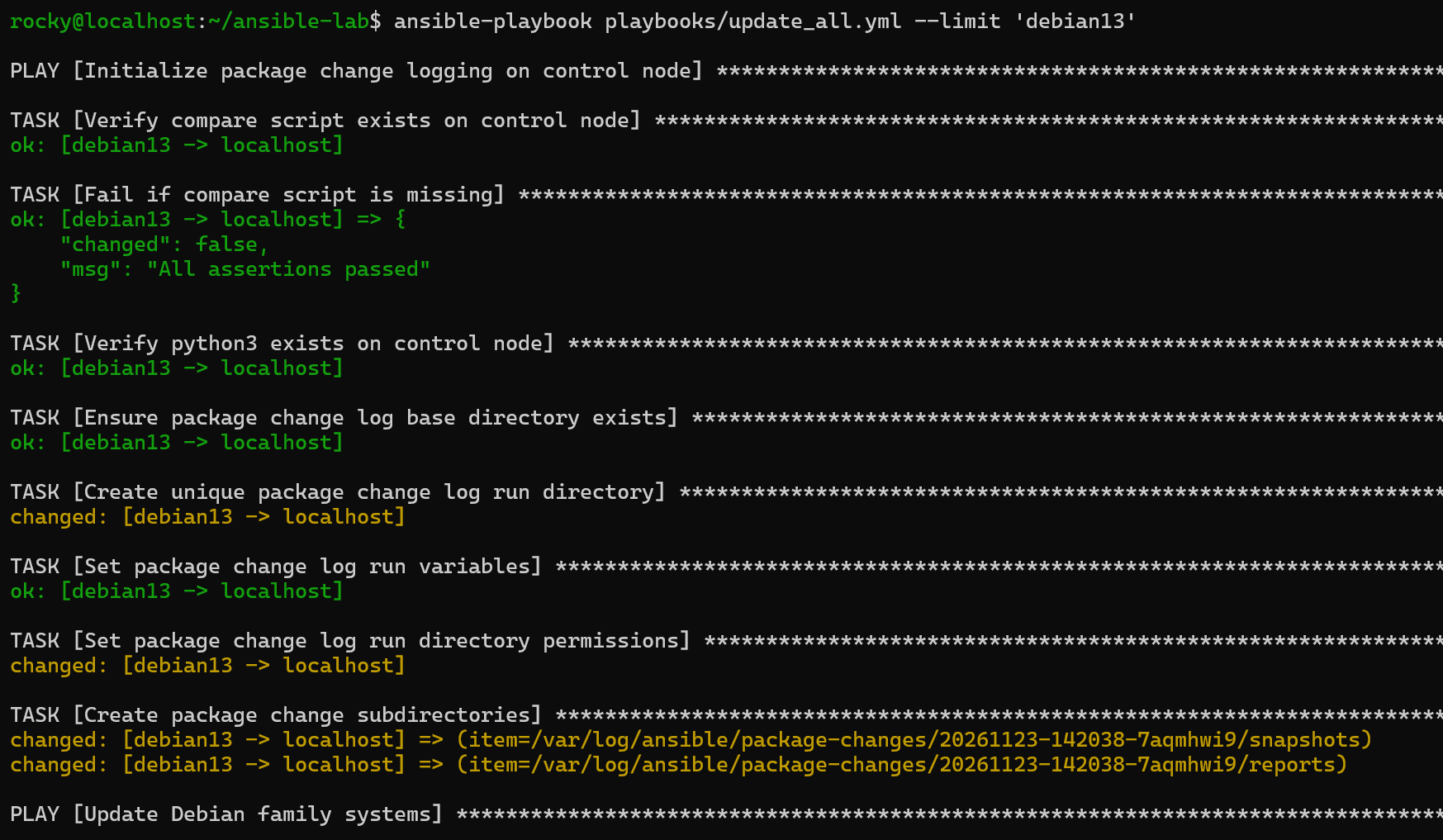
--limit 'debian13'으로 한 대만 선택한 실행에서 로그 초기화 Task가 Control node(localhost)에 snapshots와 reports 디렉터리를 생성했다.

debian13의 최종 실행 결과는 unreachable=0, failed=0이었다.재실행할 때는 --limit으로 대상을 줄이고 playbook의 처음부터 실행한다. --start-at-task로 임의의 중간 지점에서 시작하면 초기화나 위 검증까지 건너뛸 수 있으므로, 이번 구성의 정상 사용 방법으로 보지 않는다.
6) 연결 상태만 확인하는 diagnose_connection.yml 추가
기존에는 문제가 생겼을 때 수동 SSH나 ansible all -m ping으로 확인하는 정도였다. 하지만 SSH 접속 성공만으로 sudo와 Python 실행까지 정상이라고 볼 수는 없다.
새 진단 playbook은 다음 순서로 검사한다.
| 순서 | 검사 | 확인하는 내용 |
|---|---|---|
| 1 | inventory 연결 변수 출력 | 연결 변수에 표시된 접속 주소, 계정, Python 경로, SSH 설정값 |
| 2 | raw: /bin/true | Python, sudo 없이 SSH 원격 명령 실행 |
| 3 | sudo를 적용한 raw: id -u | Ansible become 경로와 실행 UID |
| 4 | sudo 없는 ansible.builtin.ping | 일반 사용자 Python 모듈 실행 |
| 5 | sudo를 적용한 ansible.builtin.ping | 현재 pipelining 설정에서 sudo와 Python 모듈 실행 |
| 6 | 현재 boot ID 조회 | 원격 명령 응답과 현재 부팅 세션 |
| 7 | 결과 요약 | UID와 boot ID, 진단의 해석 범위 |
ansible.builtin.ping은 ICMP ping이 아니다. Ansible이 접속해 Python 모듈을 실행할 수 있는지 확인하는 검사다. 진단 파일은 뒤의 부록 C에 전체 코드를 제공한다.
사용 방법은 다음과 같다.
# 모든 관리 대상의 현재 연결 상태 진단
ansible-playbook playbooks/diagnose_connection.yml

# 문제가 발생한 호스트만 진단
ansible-playbook playbooks/diagnose_connection.yml --limit 'debian13' -vvv
업데이트를 실행하던 같은 Control node의 같은 사용자 계정으로 실행한다. 이 진단은 패키지 설치, 재부팅, 서비스 재시작을 수행하지 않는다. 일반적인 SSH, sudo 감사 로그나 모듈 실행용 임시 파일은 생길 수 있다.
정상 결과에는 다음 안내가 포함된다.
Fresh Ansible connections succeeded; this does not prove the older maintenance SSH process is healthy.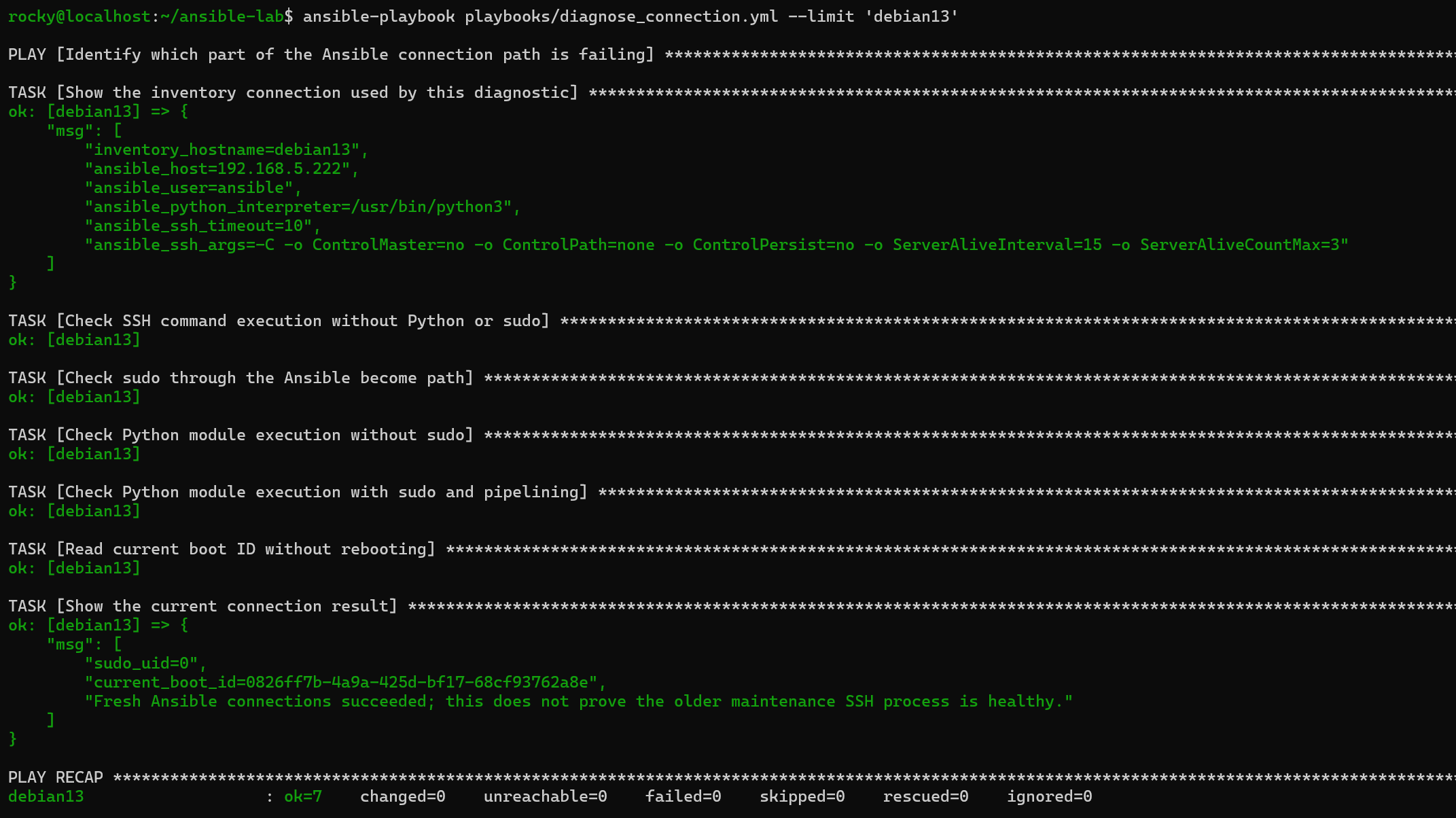
debian13에서 연결을 진단했다. SSH 원격 명령, sudo 권한 상승, Python 모듈 실행이 모두 성공했다(ok=7, unreachable=0, failed=0).출력 마지막의 Fresh Ansible connections succeeded…는 이번 진단이 성공했다는 안내다. 이 결과만으로는 앞서 멈춘 유지보수 작업의 SSH 프로세스가 정상인지 알 수 없다. 진단을 실행해도 기존 작업이 자동으로 재개되거나 해당 SSH 프로세스가 종료되지는 않는다.
raw를 사용한 SSH 검사부터 실패하면 주소 해석/SSH 인증/접속 경로 등을 먼저 확인한다. raw는 되는데 sudo 단계부터 실패하면 become 경로를, sudo 없는 ping부터 실패하면 Python 실행 경로를 우선 확인한다. 이 순서는 조사 범위를 좁히는 기준이며, 한 단계의 실패만으로 원인을 하나로 확정하지는 않는다.
7) 개선 후 update_all.yml의 실행 흐름
기존처럼 하나의 update_all.yml에서 패키지 업데이트와 필요한 경우의 재부팅을 처리한다. 전체 흐름은 다음과 같다.
- 선택된 호스트를 기준으로 Play를 시작하고, Control node에서 로그 저장 경로를 한 번 준비한다.
- Debian/RHEL 계열별로 한 대씩 업데이트 전 스냅샷, 패키지 업데이트, 업데이트 후 스냅샷과 보고서를 처리한다.
- 각 호스트의 재부팅 필요 여부를 계산한다.
- 재부팅이 필요하면 이전 boot ID를 저장하고 reboot 모듈을 실행한다.
- reboot 모듈의 내부 부팅 검증과
test_command: whoami가 끝나면 boot ID를 다시 읽어 이전 값과 비교한다. - 원격 임시 파일을 정리하고, 실행별 패키지 로그 경로를 출력한다.
재부팅이 필요하지 않으면 재부팅 및 그 전후 boot ID 검증 Task가 건너뛰어진다. 이때의 skipping은 재부팅 조건이 거짓이어서 발생하는 정상 동작이다. Debian 계열에서 서비스나 세션 재시작만 필요하면 기존 안내 메시지를 출력한다.
실제 업데이트 Play에는 serial: 1을 유지한다. 한 호스트의 업데이트와 필요한 재부팅 검증을 마친 뒤 다음 호스트로 넘어가도록 한다. 초기화 Play에는 serial을 두지 않아 실행별 공통 로그 디렉터리를 한 번 준비한다.
새 diagnose_connection.yml은 이 작업을 수행하기 전이나 연결 문제가 발생했을 때 별도로 실행하는 검사 도구다. 진단 실행 여부가 update_all.yml의 선행 조건은 아니다.
8) 기존 프로젝트에 적용하는 방법
8-1) 파일별 적용 범위
기존 프로젝트를 백업한 뒤 다음 파일을 반영한다. 부록의 예제는 8편의 로그 기본 경로를 유지하도록 정리했다.
| 파일 | 반영 내용 |
|---|---|
inventory/group_vars/all.yml | 공통 SSH 설정으로 수정 |
playbooks/update_all.yml | 초기화, --limit, Task timeout 개선 반영 |
playbooks/diagnose_connection.yml | 이번 편에서 소개하는 연결 진단 파일 추가 |
inventory/hosts.yml | 현재 환경의 기존 호스트 목록 유지 |
ansible.cfg | 기존 inventory/로그 경로 유지, 실제 로드 여부 확인 |
scripts/compare_pkg_snapshots.py | 6편부터 사용한 비교 스크립트 유지 |
부록의 update_all.yml은 다음 경로를 사용한다.
pkg_change_log_base_dir: /var/log/ansible/package-changes운영 환경에서 VM과 Bare Metal 프로젝트를 나눴다면 기존 구분을 그대로 유지하면 된다.
| 구성 | 패키지 변경 로그 기본 경로 | controller 실행 로그 예시 |
|---|---|---|
| 기존 블로그 실습 | /var/log/ansible/package-changes | /var/log/ansible/controller/update_all.log |
| VM 전용 프로젝트 | /var/log/ansible/package-changes/vm | /var/log/ansible/controller/vm_maintenance.log |
| Bare Metal 전용 프로젝트 | /var/log/ansible/package-changes/baremetal | /var/log/ansible/controller/baremetal_maintenance.log |
로그 경로를 바꿀 때는 8편에서 정한 소유자/권한과 logrotate, systemd-tmpfiles 설정도 해당 경로와 일치해야 한다. 이번 SSH 개선을 적용하기 위해 기존 로그 설계를 바꿀 필요는 없다.
처음 실습 경로를 준비한다면, 아래는 Control node의 실행 계정이 rocky인 예시다. 실제 실행 계정이 다르면 소유자와 그룹도 바꾼다.
sudo install -d -o rocky -g rocky -m 0750 /var/log/ansible/controller
sudo install -d -o rocky -g rocky -m 0750 /var/log/ansible/package-changes
8-2) 프로젝트 설정과 문법 확인
cd ~/ansible-lab
ansible --version
ansible-inventory --graph
ansible --version의 config file이 이 프로젝트의 ansible.cfg를 가리키는지 확인한다. 프로젝트 설정에 inventory = ./inventory/hosts.yml이 있으므로, 그 설정이 로드되는 조건에서는 매번 -i를 붙일 필요가 없다.
ANSIBLE_CONFIG 등으로 다른 설정 파일을 지정했거나 다른 위치에서 실행한다면 같은 전제를 적용할 수 없다. -i는 inventory를 지정하는 옵션이며, 그 자체로 원하는 ansible.cfg까지 선택해 주는 것은 아니다.
다음 명령은 업데이트와 연결 진단, 두 playbook의 문법을 확인하는 용도다.
ansible-playbook \
  playbooks/update_all.yml \
  playbooks/diagnose_connection.yml \
  --syntax-check
각 파일에 playbook: ...이 출력되고 오류 없이 끝나면 syntax check가 통과한 것이다. 원격 접속, sudo, 패키지 트랜잭션, 재부팅까지 검증한 것은 아니다.
위 명령에서 --syntax-check를 빼면 두 playbook을 실제로 순서대로 실행한다. 문법 검사와 실제 업데이트를 구분하고, 운영 실행은 아래처럼 목적별로 나누어 사용한다.
9) 실행 명령과 결과 해석
9-1) 연결 진단 후 변경 예정 내용 확인
ansible-playbook playbooks/diagnose_connection.yml
ansible-playbook playbooks/update_all.yml --check --diff
호스트 하나만 확인하려면 다음과 같다.
ansible-playbook playbooks/diagnose_connection.yml --limit 'debian13'
ansible-playbook playbooks/update_all.yml --limit 'debian13' --check --diff
--check --diff에서는 실제 패키지 업그레이드 트랜잭션을 적용하거나 서버를 재부팅하지 않으며, 실행별 패키지 스냅샷, 보고서 디렉터리도 만들지 않는다. 또한 check mode에서는 앞선 업그레이드 결과가 실제 시스템에 반영되지 않으므로, 뒤에서 확인하는 autoremove 후보가 실제 업그레이드 완료 후의 결과와 다를 수 있다.
다만 RHEL 미리보기는 check_mode: false로 둔 dnf upgrade --assumeno, dnf autoremove --assumeno 명령을 실제 실행한다. 패키지 변경에는 동의하지 않지만 DNF 캐시, 로그 같은 부수적인 쓰기까지 전혀 없다는 뜻은 아니다. Control node에는 Ansible 실행 로그도 남을 수 있다.
또한 미리보기 시점과 실제 실행 시점 사이에 저장소 상태가 달라질 수 있다. 미리보기는 검토 자료이며, 정확한 적용 결과는 실행 후 보고서로 확인한다.
9-2) 특정 호스트 또는 전체 업데이트
# 단일 호스트
ansible-playbook playbooks/update_all.yml --limit 'debian13'

# Debian 계열 그룹
ansible-playbook playbooks/update_all.yml --limit 'debian_family'

# 전체 관리 대상
ansible-playbook playbooks/update_all.yml
inventory를 명시하고 싶다면 다음처럼 실행해도 된다.
ansible-playbook -i inventory/hosts.yml playbooks/update_all.yml --limit 'debian13'--limit에는 inventory의 호스트 별칭이나 그룹 이름을 쓴다. 이 글의 debian13, almalinux10, debian_family 예시는 2편의 inventory를 따른다. 운영 환경에서 이름을 바꾸었다면 자신의 inventory에 등록한 별칭을 사용한다.
9-3) 선택 대상과 상세 실행 내용 확인
실제로 적용하기 전에 --list-hosts로 선택 범위를 확인할 수 있다.
ansible-playbook playbooks/update_all.yml --limit 'debian13' --list-hosts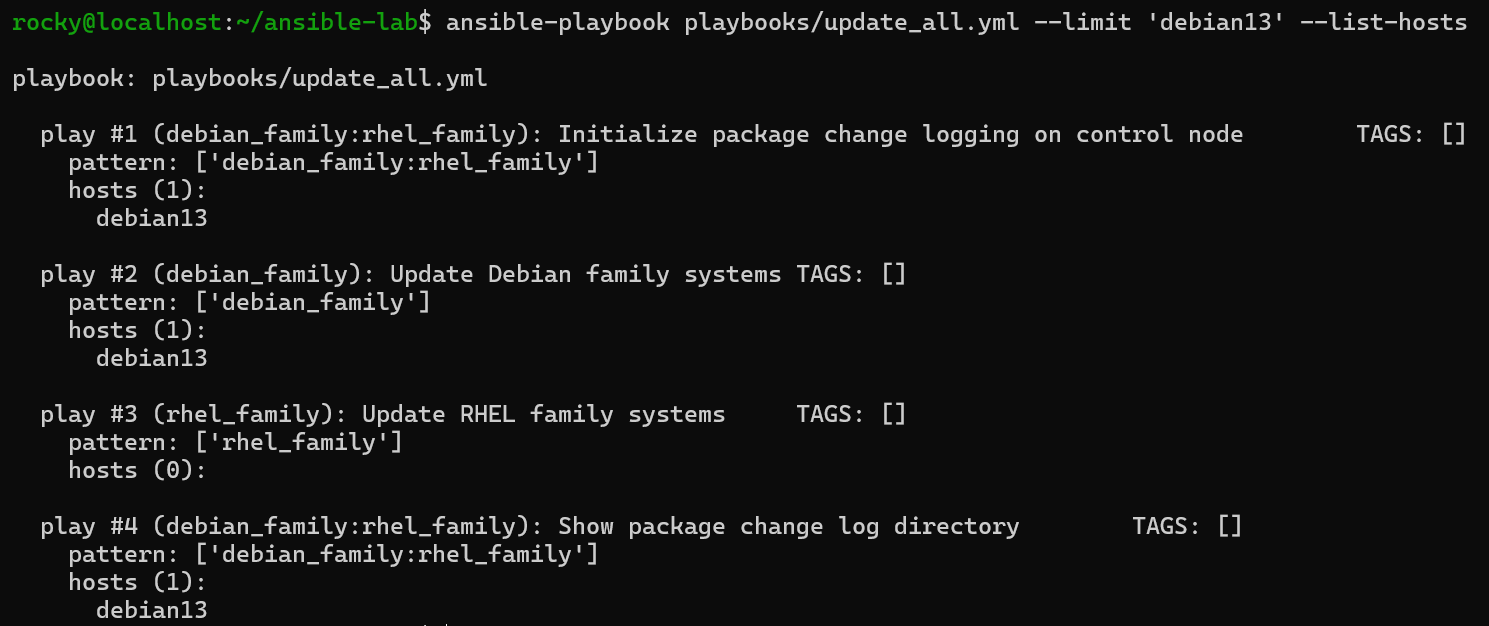
--limit 'debian13' --list-hosts로 확인한 Play별 대상 호스트 목록. 실제 작업은 실행하지 않는다.debian13을 선택하면 Debian 업데이트 Play에는 debian13이 표시되고, RHEL 업데이트 Play에는 hosts (0)이 표시된다. almalinux10을 선택하면 RHEL 업데이트 Play에 almalinux10이 표시되고, Debian 업데이트 Play에는 hosts (0)이 표시된다. 두 경우 모두 로그 초기화 Play와 마지막 로그 경로 출력 Play에는 선택한 호스트가 포함된다.
상세 출력이 필요하면 실제 업데이트 명령에 -vvv를 붙인다.
ansible-playbook playbooks/update_all.yml --limit 'debian13' -vvv-vvv는 출력 정보를 늘리는 옵션이다. 연결 복구나 재부팅을 활성화하는 필수 옵션은 아니다. SSH 명령을 더 자세히 확인하려면 -vvvv를 사용할 수 있다. 위 명령은 실제 업데이트이며, 미리보기만 원하면 --check --diff를 함께 지정한다.
9-4) changed=0만으로 정상 여부를 판단하지 않는다
3편의 기본형에서는 재실행 후 changed=0을 정상 확인 기준으로 설명했다. 하지만 6편 이후에는 실행 디렉터리, 스냅샷 임시 파일을 만드는 작업이 추가되었다. 패키지가 바뀌지 않아도 전체 recap의 changed가 0이 아닐 수 있다.
또한 run_once로 실행한 Control node 초기화 결과가 첫 번째 선택 호스트에 표시되어, 그 호스트의 ok나 changed 수가 다른 호스트보다 많을 수 있다. 이것은 그 서버에 추가 패키지를 설치했다는 뜻이 아니다.
판단할 때는 다음을 함께 확인한다.
failed=0,unreachable=0인지- 재부팅이 필요하다고 판단한 호스트에서 reboot Task와 전후 boot ID 비교가 성공했는지
- 패키지 변경 보고서의
upgraded,installed,removed값과 상세 목록 - 웹, DB 등 실제 서비스가 정상인지
보고서의 패키지 수와 recap의 Task 수는 서로 다른 값이다. update_only: true를 사용해도 업데이트에 필요한 새 의존성이나 새 커널 패키지가 설치될 수 있으므로, 보고서의 installed 값이 0보다 크다는 사실만으로 오류라고 판단하지 않는다.
10) 실제 업데이트 및 조건부 재부팅 결과
2026년 11월 2일에는 VM 9대와 물리 호스트 2대에 개선판을 적용했다. 아래는 update_all.yml 실행 로그에 나타난 패키지 변경과 조건부 재부팅 결과다. 실제 호스트 이름은 익명화하고, 구분을 위한 식별자와 OS를 함께 표기했다. 같은 OS를 사용하는 행도 각각 다른 호스트를 뜻한다.
| 대상 | 업그레이드 | 신규 설치 | 제거 | 업데이트 Play의 조건부 재부팅 |
|---|---|---|---|---|
| VM-01: Debian 13 | 2 | 0 | 0 | 필요 없음으로 판단하여 건너뜀 |
| VM-02: Ubuntu 24.04 | 1 | 0 | 0 | 필요 없음으로 판단하여 건너뜀 |
| VM-03: Debian 13 | 1 | 0 | 0 | 필요 없음으로 판단하여 건너뜀 |
| VM-04: Debian 13 (arm64) | 37 | 0 | 0 | 필요 없음으로 판단하여 건너뜀 |
| VM-05: Debian 13 (arm64) | 6 | 0 | 0 | 필요 없음으로 판단하여 건너뜀 |
| VM-06: Rocky Linux 10 | 133 | 7 | 6 | 재부팅 및 boot ID 검증 성공 |
| VM-07: AlmaLinux 10 | 132 | 7 | 6 | 재부팅 및 boot ID 검증 성공 |
| VM-08: AlmaLinux 10 (arm64) | 60 | 5 | 5 | 재부팅 및 boot ID 검증 성공 |
| VM-09: AlmaLinux 10 (arm64) | 60 | 5 | 5 | 재부팅 및 boot ID 검증 성공 |
| Host-01: RHEL 10 | 202 | 25 | 6 | 재부팅 및 boot ID 검증 성공 |
| Host-02: AlmaLinux 10 (arm64) | 189 | 7 | 6 | 재부팅 및 boot ID 검증 성공 |
VM 보고서 합계는 업그레이드 432건, 신규 설치 24건, 제거 22건이었다. 물리 호스트 합계는 각각 391건, 32건, 12건이었다. 여러 서버에 같은 패키지가 있으면 각각 집계되는 값이며, 전체 환경의 고유 패키지 종류 수는 아니다.
패키지 변경 수는 사전 준비 작업 이후 수집한 before 스냅샷과 업데이트 후 수집한 after 스냅샷을 비교한 결과다. 따라서 사전 준비 단계에서 새로 설치된 needrestart나 dnf-plugins-core는 이 보고서의 변경 수에 포함되지 않을 수 있다.
Debian 계열에서는 패키지를 제거한 뒤 설정 파일만 남아 있어도 dpkg-query -W 목록에 해당 패키지가 남을 수 있다. 현재 플레이북은 패키지 이름과 버전만 비교하므로, 두 스냅샷에 같은 이름과 버전이 남아 있으면 보고서에 '제거'로 집계되지 않는다.
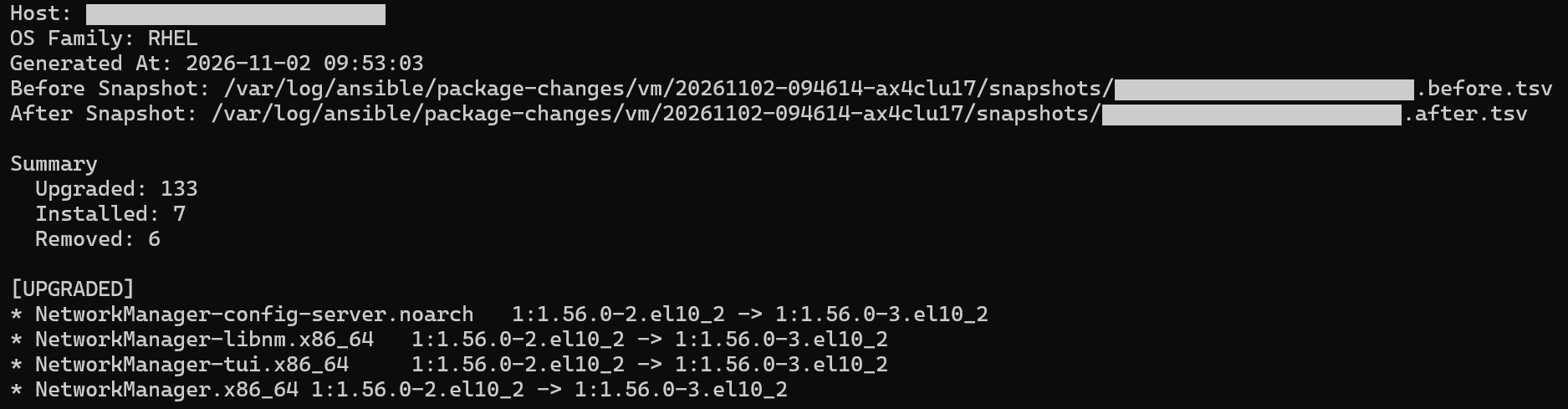
11대 모두 업데이트 실행의 recap에서 failed=0, unreachable=0으로 완료되었다. 이 가운데 Debian 계열 VM 5대는 deb_reboot_required=False였으므로 재부팅 및 boot ID 비교 Task가 건너뛰어졌다. RHEL 계열 VM 4대와 물리 호스트 2대, 총 6대는 재부팅이 필요한 것으로 판단되어 실제 재부팅과 전후 boot ID 검증을 통과했다.
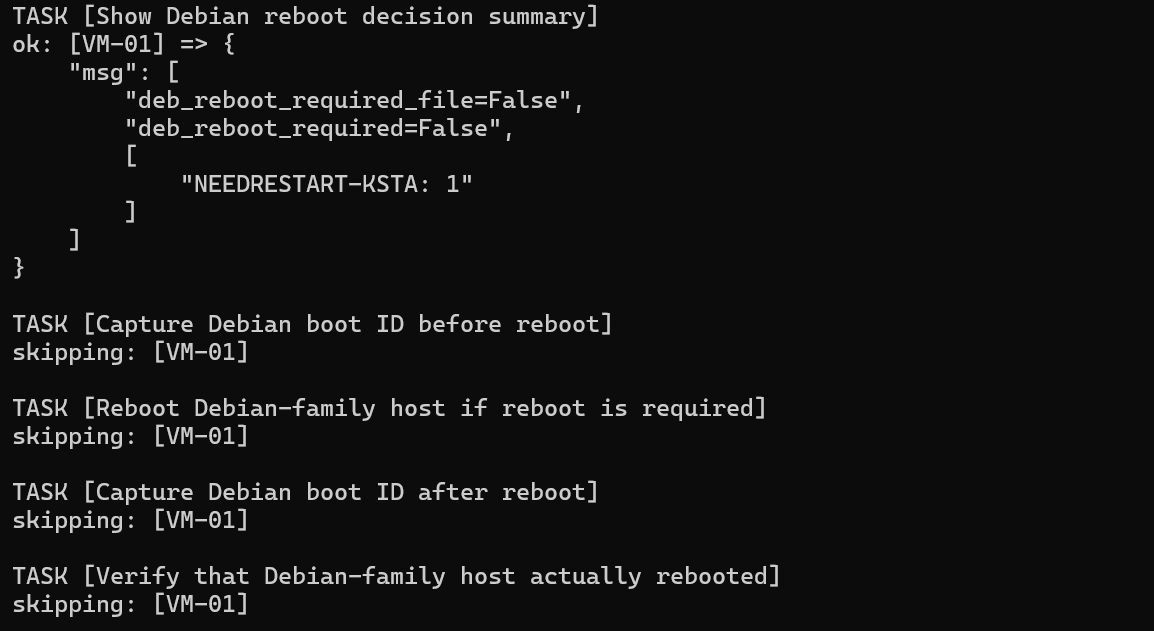
deb_reboot_required=False로 판단되어 재부팅과 전후 boot ID 수집, 검증을 모두 건너뛰었다.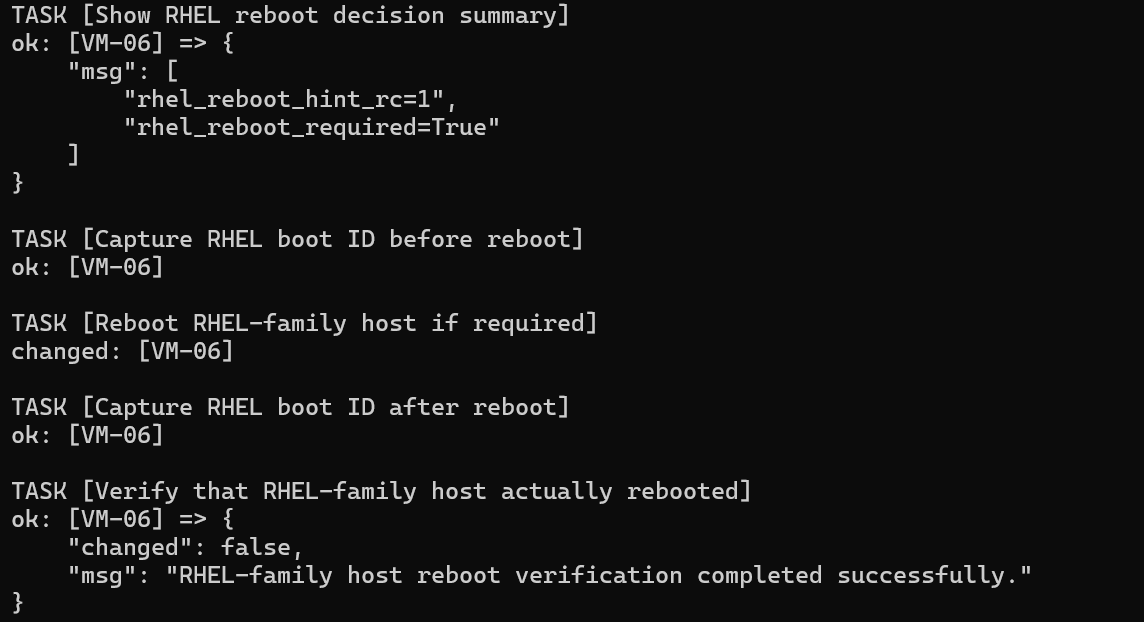
rhel_reboot_required=True로 판단되어 재부팅을 수행했고, 재부팅 전후의 boot ID가 달라졌음을 확인했다.따라서 이 결과에서 확인한 것은 다음 두 가지다.
- 11대의 패키지 업데이트와 보고서 생성 경로가 정상 완료되었다.
- 재부팅이 필요하다고 판단한 RHEL 계열 6대에서 조건부 재부팅과 boot ID 검증이 성공했다.
Debian 계열 VM은 이번 실행 2~3일 전에도 수동으로 패키지를 업데이트하고 재부팅한 이력이 있다. 11월 2일 실행에서는 5대 모두 /run/reboot-required 파일이 없었고, needrestart의 커널 상태는 NEEDRESTART-KSTA: 1(대기 중인 커널 업그레이드 없음)이었다. 이에 따라 플레이북은 deb_reboot_required=False로 판단해 조건부 재부팅과 전후 boot ID 비교를 건너뛰었다. 따라서 이날 결과만으로 Debian 계열의 조건부 재부팅 실행 경로까지 검증했다고 볼 수는 없다. 또한 재부팅이 필요하지 않다는 판단이 개별 서비스나 세션의 재시작도 필요 없다는 뜻은 아니다.
별도로 실행한 연결 진단은 각 호스트에서 ok=7, changed=0, failed=0, unreachable=0이었고 sudo UID도 0으로 확인되었다. 이 결과는 진단을 실행한 시점의 새 연결 상태에 대한 확인이다.
기존 코드도 정상 완료되는 날이 있었다. 이번 결과는 개선판의 실제 운영 경로가 정상 동작했다는 근거지만, 간헐적 문제의 유일한 원인을 입증하거나 앞으로의 모든 정체를 배제하는 결과는 아니다. 업데이트 중 Tailscale 등 다른 패키지도 변경되었으므로 개선 효과가 SSH 옵션 하나 때문이라고 단정할 수도 없다.
이 운영 실행은 정상 경로를 확인한 것이다. 2100초 timeout을 일부러 발생시킨 장애 주입 시험이나, 모든 --limit 조합을 운영 서버에서 실행한 시험과는 구분해야 한다. 정체가 재발하면 controller 로그의 Task 시작, 종료 시각과 진단 결과를 함께 수집한다.
Bare Metal inventory에서 Debian 계열 호스트가 없다면 Debian Play의 skipping: no hosts matched는 정상이다. 물리 호스트의 조건부 재부팅도 그 위의 VM과 서비스에 영향을 줄 수 있으므로, 기존에 정한 유지보수 순서와 게스트 자동 시작, 서비스 확인 절차를 함께 적용한다.
11) 다시 멈췄을 때 확인할 순서와 남은 한계
재발하면 우선 마지막 Task가 무엇인지 구분한다. 패키지 업데이트 중인지, reboot action 안인지, 재부팅 후 boot ID를 조회하거나 비교하는 단계인지, 임시 파일 정리 중인지에 따라 조사 대상이 달라진다.
가능하면 기존 작업을 바로 중복 실행하지 않고, 다른 터미널에서 같은 계정과 inventory로 진단 playbook을 실행한다. 이때 기존 유지보수 프로세스의 시작 시각, controller 로그의 마지막 Task, 새 진단 결과를 함께 남기면 비교하기 쉽다.
ansible-playbook playbooks/diagnose_connection.yml --limit 'debian13' -vvv실제 inventory와 같은 주소로 SSH 명령 실행도 비교할 수 있다.
ssh -o ConnectTimeout=10 \
  -o ControlMaster=no \
  -o ControlPath=none \
  -o ControlPersist=no \
  -o ServerAliveInterval=15 \
  -o ServerAliveCountMax=3 \
  ansible@관리대상주소 \
  'id -u && sudo -n id -u && cat /proc/sys/kernel/random/boot_id'
앞선 명령이 성공했을 때만 다음 명령을 실행하도록 &&로 연결했다. 관리대상주소는 실제 inventory의 ansible_host 값으로 바꾸고, SSH 사용자, 개인 키, 포트도 inventory 설정과 맞춰 비교한다.
이 수동 명령에는 플레이북에 설정한 Ansible Task 수준의 실행 시간 제한(timeout)이 적용되지 않는다. ConnectTimeout은 연결 수립 대기를 제한하고, ServerAliveInterval과 ServerAliveCountMax는 SSH 서버의 무응답을 감지하기 위한 설정이다. 따라서 SSH 서버가 응답하더라도 원격 명령 실행이 멈추면 대기가 계속될 수 있다. 끝나지 않으면 그 사실도 조사 근거로 남긴다. 진단이 정상이라고 이전 작업까지 정상으로 간주하지 않으며, 서버가 이미 재부팅되었다면 실패 표시만 보고 즉시 재부팅을 반복하지 않는다.
이번 개선의 적용 범위에도 한계가 있다.
- 패키지 설치, facts 수집, 스냅샷 전송 등 모든 Task에 총 실행 제한을 추가한 것은 아니다. 정체 위치가 그쪽이면 별도로 조사해야 한다.
- 기존
needrestart조회와 DNF 미리보기에는failed_when: false가 남아 있다. 조회 오류가 정상 결과처럼 묻힐 수 있으므로, 빈 출력이나 오류가 있으면 재부팅 판단 또는 미리보기 성공으로 받아들이지 말고 종료 코드와 stderr를 확인해야 한다. 이 부분은 후속 개선 대상으로 남는다. update_all.yml의 reboot 모듈과 boot ID 비교는 새 부팅 세션에서 원격 명령이 실행되는지 검증한다. 진단 playbook의 Ansible ping은 그 진단 시점의 Python 모듈 실행을 검사한다. 어느 쪽도 파일 접근, DB 연결, 웹 응답, 가상머신 자동 시작까지 검사하지는 않는다.- Debian에서
/run/reboot-required가 없고needrestart의 커널 상태가 누락되거나 0(판별 불가)이면, 현재 코드는 재부팅 조건을 거짓으로 계산할 수 있다. 이 경우의 False를 ‘재부팅 불필요 확인’으로 해석하지 않는다.
7편에서 다룬 .dpkg-dist, .dpkg-old, .rpmnew, .rpmsave 검토와 서비스별 상태, 로그, 실제 기능 확인은 계속 필요하다.
12) 적용할 전체 코드
아래 코드는 update_all.yml 개선판을 1~9편의 실습 로그 경로에 맞춘 것이다. inventory/hosts.yml과 6편의 scripts/compare_pkg_snapshots.py는 기존 파일을 사용한다. Play별로 남아 있던 ansible_ssh_args는 제거했으므로, 3절의 공통 변수 파일까지 함께 반영해야 한다. 연결 진단 파일은 부록 C에서 새로 추가한다.
부록 A. ~/ansible-lab/ansible.cfg
8편의 controller 로그 경로를 사용하는 예시다. VM/Bare Metal 프로젝트에서는 자신이 사용하던 로그 경로를 유지한다.
[defaults]
inventory = ./inventory/hosts.yml
host_key_checking = True
retry_files_enabled = False
interpreter_python = auto_silent
timeout = 30
forks = 10
gathering = smart

log_path = /var/log/ansible/controller/update_all.log
display_args_to_stdout = False

[privilege_escalation]
become = False
become_method = sudo
become_ask_pass = False

[ssh_connection]
pipelining = True
ssh_args = -o ControlMaster=auto -o ControlPersist=60s
부록 B. ~/ansible-lab/playbooks/update_all.yml
기존 초기화 Play, Debian/RHEL 업데이트 Play, 마지막 로그 경로 출력 Play를 아래 전체 코드로 교체한다. 로그 초기화 Play는 serial 없이 한 번, 실제 OS 업데이트 Play는 serial: 1로 실행한다.
---
- name: Initialize package change logging on control node
  hosts: debian_family:rhel_family
  order: sorted
  strategy: linear
  any_errors_fatal: true
  become: false
  gather_facts: false
  vars:
    pkg_change_log_base_dir: /var/log/ansible/package-changes
    pkg_compare_script_path: "{{ playbook_dir }}/../scripts/compare_pkg_snapshots.py"

  tasks:
    - name: Initialize controller logs once for the selected managed hosts
      delegate_to: localhost
      run_once: true
      become: false
      vars:
        ansible_connection: local
        ansible_python_interpreter: "{{ ansible_playbook_python }}"
      block:
        - name: Verify compare script exists on control node
          ansible.builtin.stat:
            path: "{{ pkg_compare_script_path }}"
          register: pkg_compare_script_stat

        - name: Fail if compare script is missing
          ansible.builtin.assert:
            that:
              - pkg_compare_script_stat.stat.exists
              - pkg_compare_script_stat.stat.isreg
            fail_msg: "compare_pkg_snapshots.py 파일이 없습니다: {{ pkg_compare_script_path }}"

        - name: Verify python3 exists on control node
          ansible.builtin.command:
            argv:
              - python3
              - --version
          changed_when: false
          check_mode: false

        - name: Ensure package change log base directory exists
          ansible.builtin.file:
            path: "{{ pkg_change_log_base_dir }}"
            state: directory
            mode: "0750"
          when: not ansible_check_mode

        - name: Create unique package change log run directory
          ansible.builtin.tempfile:
            state: directory
            path: "{{ pkg_change_log_base_dir }}"
            prefix: "{{ lookup('pipe', 'date +%Y%m%d-%H%M%S') }}-"
          register: pkg_change_log_root_dir_tmp
          when: not ansible_check_mode

        - name: Set package change log run variables
          ansible.builtin.set_fact:
            pkg_change_log_root_dir: "{{ pkg_change_log_root_dir_tmp.path }}"
            pkg_change_log_run_id: "{{ pkg_change_log_root_dir_tmp.path | basename }}"
            pkg_compare_script: "{{ pkg_compare_script_path }}"
          delegate_facts: true
          when: not ansible_check_mode

        - name: Set package change log run directory permissions
          ansible.builtin.file:
            path: "{{ hostvars['localhost'].pkg_change_log_root_dir }}"
            state: directory
            mode: "0750"
          when: not ansible_check_mode

        - name: Create package change subdirectories
          ansible.builtin.file:
            path: "{{ item }}"
            state: directory
            mode: "0750"
          loop:
            - "{{ hostvars['localhost'].pkg_change_log_root_dir }}/snapshots"
            - "{{ hostvars['localhost'].pkg_change_log_root_dir }}/reports"
          when: not ansible_check_mode

- name: Update Debian family systems
  hosts: debian_family
  order: sorted
  serial: 1
  any_errors_fatal: true
  become: true
  gather_facts: true

  module_defaults:
    ansible.builtin.apt:
      force_apt_get: true
      lock_timeout: 300
      update_cache_retries: 10
      update_cache_retry_max_delay: 30
      dpkg_options: "force-confold"

  vars:
    pkg_snapshot_dir: "{{ hostvars['localhost'].pkg_change_log_root_dir }}/snapshots"
    pkg_report_dir: "{{ hostvars['localhost'].pkg_change_log_root_dir }}/reports"
    pkg_compare_script: "{{ hostvars['localhost'].pkg_compare_script }}"
    reboot_timeout_seconds: 900
    reboot_task_timeout_seconds: 2100
    verification_task_timeout_seconds: 120
    connect_timeout_seconds: 10
    post_reboot_delay_seconds: 30

  pre_tasks:
    - name: Require controller logging initialization before package changes
      ansible.builtin.assert:
        that:
          - hostvars['localhost'].pkg_change_log_root_dir is defined
          - hostvars['localhost'].pkg_compare_script is defined
        fail_msg: "Controller log initialization was skipped. Run the playbook from its beginning; do not skip initialization with --start-at-task."
      when: not ansible_check_mode

  tasks:
    - name: Refresh apt cache
      ansible.builtin.apt:
        update_cache: true
        cache_valid_time: 3600

    - name: Ensure needrestart is installed as an update prerequisite
      ansible.builtin.apt:
        name: needrestart
        state: present

    - name: Preview Debian-family updates in check mode
      when: ansible_check_mode
      block:
        - name: Preview Debian package upgrades
          ansible.builtin.apt:
            name: "*"
            state: latest
            fail_on_autoremove: true

        - name: Preview Debian autoremove
          ansible.builtin.apt:
            autoremove: true

    - name: Apply Debian-family updates and write package change logs
      when: not ansible_check_mode
      block:
        - name: Create Debian snapshot temp file before update
          ansible.builtin.tempfile:
            state: file
            path: /var/tmp
            prefix: "ansible-pkg-before-"
            suffix: ".tsv"
          register: deb_pkg_before_tmp

        - name: Create Debian snapshot temp file after update
          ansible.builtin.tempfile:
            state: file
            path: /var/tmp
            prefix: "ansible-pkg-after-"
            suffix: ".tsv"
          register: deb_pkg_after_tmp

        - name: Capture Debian package snapshot before update
          ansible.builtin.shell: |
            set -o pipefail
            dpkg-query -W -f='${binary:Package}\t${Version}\n' | sort > {{ deb_pkg_before_tmp.path | quote }}
          args:
            executable: /bin/bash
          environment:
            LC_ALL: C
            LANGUAGE: C
          changed_when: false

        - name: Fetch Debian package snapshot before update
          ansible.builtin.fetch:
            src: "{{ deb_pkg_before_tmp.path }}"
            dest: "{{ pkg_snapshot_dir }}/{{ inventory_hostname }}.before.tsv"
            flat: true
            validate_checksum: true
          changed_when: false

        - name: Apply Debian package upgrades
          ansible.builtin.apt:
            name: "*"
            state: latest
            fail_on_autoremove: true

        - name: Apply Debian autoremove
          ansible.builtin.apt:
            autoremove: true

        - name: Check Debian/Ubuntu reboot-required flag
          ansible.builtin.stat:
            path: /run/reboot-required
          register: deb_reboot_required_file

        - name: Run needrestart in batch mode
          ansible.builtin.command:
            argv:
              - needrestart
              - -b
          register: deb_needrestart
          changed_when: false
          failed_when: false

        - name: Show needrestart summary
          ansible.builtin.debug:
            msg: "{{ deb_needrestart.stdout_lines | default([]) }}"

        - name: Capture Debian package snapshot after update
          ansible.builtin.shell: |
            set -o pipefail
            dpkg-query -W -f='${binary:Package}\t${Version}\n' | sort > {{ deb_pkg_after_tmp.path | quote }}
          args:
            executable: /bin/bash
          environment:
            LC_ALL: C
            LANGUAGE: C
          changed_when: false

        - name: Fetch Debian package snapshot after update
          ansible.builtin.fetch:
            src: "{{ deb_pkg_after_tmp.path }}"
            dest: "{{ pkg_snapshot_dir }}/{{ inventory_hostname }}.after.tsv"
            flat: true
            validate_checksum: true
          changed_when: false

        - name: Build Debian package change report on control node
          ansible.builtin.command:
            argv:
              - python3
              - "{{ pkg_compare_script }}"
              - --before
              - "{{ pkg_snapshot_dir }}/{{ inventory_hostname }}.before.tsv"
              - --after
              - "{{ pkg_snapshot_dir }}/{{ inventory_hostname }}.after.tsv"
              - --report
              - "{{ pkg_report_dir }}/{{ inventory_hostname }}.txt"
              - --json
              - "{{ pkg_report_dir }}/{{ inventory_hostname }}.json"
              - --host
              - "{{ inventory_hostname }}"
              - --os-family
              - Debian
          delegate_to: localhost
          become: false
          throttle: 1
          timeout: 120
          register: deb_pkg_report_result
          changed_when: false

        - name: Show Debian package change summary
          ansible.builtin.debug:
            msg: "{{ deb_pkg_report_result.stdout_lines | default([]) }}"

        - name: Set Debian reboot decision
          ansible.builtin.set_fact:
            deb_reboot_required: >-
              {{
                deb_reboot_required_file.stat.exists
                or ((deb_needrestart.stdout | default('')) is search('(?m)^NEEDRESTART-KSTA:[ \t]*[23][ \t]*$'))
              }}
          changed_when: false

        - name: Show Debian reboot decision summary
          ansible.builtin.debug:
            msg:
              - "deb_reboot_required_file={{ deb_reboot_required_file.stat.exists }}"
              - "deb_reboot_required={{ deb_reboot_required }}"
              - "{{ deb_needrestart.stdout_lines | default([]) | select('search', '^NEEDRESTART-KSTA:') | list }}"

        - name: Capture Debian boot ID before reboot
          ansible.builtin.command:
            argv:
              - cat
              - /proc/sys/kernel/random/boot_id
          register: deb_boot_id_before
          timeout: "{{ verification_task_timeout_seconds | int }}"
          changed_when: false
          when: deb_reboot_required | bool

        - name: Reboot Debian-family host if reboot is required
          ansible.builtin.reboot:
            msg: "Reboot initiated by Ansible after Debian/Ubuntu updates"
            connect_timeout: "{{ connect_timeout_seconds }}"
            reboot_timeout: "{{ reboot_timeout_seconds }}"
            post_reboot_delay: "{{ post_reboot_delay_seconds }}"
            test_command: whoami
          timeout: "{{ reboot_task_timeout_seconds | int }}"
          register: deb_reboot_result
          when: deb_reboot_required | bool

        - name: Capture Debian boot ID after reboot
          ansible.builtin.command:
            argv:
              - cat
              - /proc/sys/kernel/random/boot_id
          register: deb_boot_id_after
          timeout: "{{ verification_task_timeout_seconds | int }}"
          changed_when: false
          when: deb_reboot_required | bool

        - name: Verify that Debian-family host actually rebooted
          ansible.builtin.assert:
            that:
              - deb_boot_id_before.stdout != deb_boot_id_after.stdout
            fail_msg: "Debian-family host did not actually reboot."
            success_msg: "Debian-family host reboot verification completed successfully."
          when: deb_reboot_required | bool

        - name: Warn if services or sessions still need restart without full reboot
          ansible.builtin.debug:
            msg:
              - "needrestart reported restartable services or sessions."
              - "{{ deb_needrestart.stdout_lines | default([]) | select('search', '^NEEDRESTART-(SVC|SESS):') | list }}"
              - "Consider restarting affected services if no full reboot was performed."
          when:
            - not deb_reboot_required | bool
            - (deb_needrestart.stdout | default('')) is search('(?m)^NEEDRESTART-(SVC|SESS):')

      always:
        - name: Remove Debian snapshot temp files
          timeout: "{{ verification_task_timeout_seconds | int }}"
          ansible.builtin.file:
            path: "{{ item }}"
            state: absent
          loop: "{{ [deb_pkg_before_tmp.path | default(''), deb_pkg_after_tmp.path | default('')] | reject('equalto', '') | list }}"
          changed_when: false

- name: Update RHEL family systems
  hosts: rhel_family
  order: sorted
  serial: 1
  any_errors_fatal: true
  become: true
  gather_facts: true

  module_defaults:
    ansible.builtin.dnf:
      lock_timeout: 300

  vars:
    pkg_snapshot_dir: "{{ hostvars['localhost'].pkg_change_log_root_dir }}/snapshots"
    pkg_report_dir: "{{ hostvars['localhost'].pkg_change_log_root_dir }}/reports"
    pkg_compare_script: "{{ hostvars['localhost'].pkg_compare_script }}"
    reboot_timeout_seconds: 900
    reboot_task_timeout_seconds: 2100
    verification_task_timeout_seconds: 120
    connect_timeout_seconds: 10
    post_reboot_delay_seconds: 30

  pre_tasks:
    - name: Require controller logging initialization before package changes
      ansible.builtin.assert:
        that:
          - hostvars['localhost'].pkg_change_log_root_dir is defined
          - hostvars['localhost'].pkg_compare_script is defined
        fail_msg: "Controller log initialization was skipped. Run the playbook from its beginning; do not skip initialization with --start-at-task."
      when: not ansible_check_mode

  tasks:
    - name: Ensure dnf-plugins-core is installed as an update prerequisite
      ansible.builtin.dnf:
        name: dnf-plugins-core
        state: present
        update_cache: true

    - name: Preview RHEL upgrade transaction
      ansible.builtin.command:
        argv:
          - dnf
          - upgrade
          - --assumeno
      register: rhel_upgrade_preview
      changed_when: false
      failed_when: false
      check_mode: false
      when: ansible_check_mode

    - name: Show RHEL upgrade preview
      ansible.builtin.debug:
        msg: "{{ rhel_upgrade_preview.stdout_lines | default([]) }}"
      when: ansible_check_mode

    - name: Preview RHEL autoremove transaction
      ansible.builtin.command:
        argv:
          - dnf
          - autoremove
          - --assumeno
      register: rhel_autoremove_preview
      changed_when: false
      failed_when: false
      check_mode: false
      when: ansible_check_mode

    - name: Show RHEL autoremove preview
      ansible.builtin.debug:
        msg: "{{ rhel_autoremove_preview.stdout_lines | default([]) }}"
      when: ansible_check_mode

    - name: Preview RHEL-family updates in check mode
      when: ansible_check_mode
      block:
        - name: Preview RHEL package upgrades with dnf module
          ansible.builtin.dnf:
            name: "*"
            state: latest
            update_cache: true
            update_only: true

        - name: Preview RHEL autoremove with dnf module
          ansible.builtin.dnf:
            autoremove: true

    - name: Apply RHEL-family updates and write package change logs
      when: not ansible_check_mode
      block:
        - name: Create RHEL snapshot temp file before update
          ansible.builtin.tempfile:
            state: file
            path: /var/tmp
            prefix: "ansible-pkg-before-"
            suffix: ".tsv"
          register: rhel_pkg_before_tmp

        - name: Create RHEL snapshot temp file after update
          ansible.builtin.tempfile:
            state: file
            path: /var/tmp
            prefix: "ansible-pkg-after-"
            suffix: ".tsv"
          register: rhel_pkg_after_tmp

        - name: Capture RHEL package snapshot before update
          ansible.builtin.shell: |
            set -o pipefail
            rpm -qa --qf '%{NAME}.%{ARCH}\t%{EVR}\n' | sort > {{ rhel_pkg_before_tmp.path | quote }}
          args:
            executable: /bin/bash
          environment:
            LC_ALL: C
          changed_when: false

        - name: Fetch RHEL package snapshot before update
          ansible.builtin.fetch:
            src: "{{ rhel_pkg_before_tmp.path }}"
            dest: "{{ pkg_snapshot_dir }}/{{ inventory_hostname }}.before.tsv"
            flat: true
            validate_checksum: true
          changed_when: false

        - name: Apply RHEL package upgrades
          ansible.builtin.dnf:
            name: "*"
            state: latest
            update_cache: true
            update_only: true

        - name: Apply RHEL autoremove
          ansible.builtin.dnf:
            autoremove: true

        - name: Capture RHEL package snapshot after update
          ansible.builtin.shell: |
            set -o pipefail
            rpm -qa --qf '%{NAME}.%{ARCH}\t%{EVR}\n' | sort > {{ rhel_pkg_after_tmp.path | quote }}
          args:
            executable: /bin/bash
          environment:
            LC_ALL: C
          changed_when: false

        - name: Fetch RHEL package snapshot after update
          ansible.builtin.fetch:
            src: "{{ rhel_pkg_after_tmp.path }}"
            dest: "{{ pkg_snapshot_dir }}/{{ inventory_hostname }}.after.tsv"
            flat: true
            validate_checksum: true
          changed_when: false

        - name: Build RHEL package change report on control node
          ansible.builtin.command:
            argv:
              - python3
              - "{{ pkg_compare_script }}"
              - --before
              - "{{ pkg_snapshot_dir }}/{{ inventory_hostname }}.before.tsv"
              - --after
              - "{{ pkg_snapshot_dir }}/{{ inventory_hostname }}.after.tsv"
              - --report
              - "{{ pkg_report_dir }}/{{ inventory_hostname }}.txt"
              - --json
              - "{{ pkg_report_dir }}/{{ inventory_hostname }}.json"
              - --host
              - "{{ inventory_hostname }}"
              - --os-family
              - RHEL
          delegate_to: localhost
          become: false
          throttle: 1
          timeout: 120
          register: rhel_pkg_report_result
          changed_when: false

        - name: Show RHEL package change summary
          ansible.builtin.debug:
            msg: "{{ rhel_pkg_report_result.stdout_lines | default([]) }}"

        - name: Check RHEL reboot hint
          ansible.builtin.command:
            argv:
              - dnf
              - needs-restarting
              - --reboothint
          register: rhel_reboot_hint
          changed_when: false
          failed_when: rhel_reboot_hint.rc not in [0, 1]

        - name: Set RHEL reboot decision
          ansible.builtin.set_fact:
            rhel_reboot_required: "{{ rhel_reboot_hint.rc == 1 }}"
          changed_when: false

        - name: Show RHEL reboot decision summary
          ansible.builtin.debug:
            msg:
              - "rhel_reboot_hint_rc={{ rhel_reboot_hint.rc }}"
              - "rhel_reboot_required={{ rhel_reboot_required }}"

        - name: Capture RHEL boot ID before reboot
          ansible.builtin.command:
            argv:
              - cat
              - /proc/sys/kernel/random/boot_id
          register: rhel_boot_id_before
          timeout: "{{ verification_task_timeout_seconds | int }}"
          changed_when: false
          when: rhel_reboot_required | bool

        - name: Reboot RHEL-family host if required
          ansible.builtin.reboot:
            msg: "Reboot initiated by Ansible after package updates"
            connect_timeout: "{{ connect_timeout_seconds }}"
            reboot_timeout: "{{ reboot_timeout_seconds }}"
            post_reboot_delay: "{{ post_reboot_delay_seconds }}"
            test_command: whoami
          timeout: "{{ reboot_task_timeout_seconds | int }}"
          register: rhel_reboot_result
          when: rhel_reboot_required | bool

        - name: Capture RHEL boot ID after reboot
          ansible.builtin.command:
            argv:
              - cat
              - /proc/sys/kernel/random/boot_id
          register: rhel_boot_id_after
          timeout: "{{ verification_task_timeout_seconds | int }}"
          changed_when: false
          when: rhel_reboot_required | bool

        - name: Verify that RHEL-family host actually rebooted
          ansible.builtin.assert:
            that:
              - rhel_boot_id_before.stdout != rhel_boot_id_after.stdout
            fail_msg: "RHEL-family host did not actually reboot."
            success_msg: "RHEL-family host reboot verification completed successfully."
          when: rhel_reboot_required | bool

      always:
        - name: Remove RHEL snapshot temp files
          timeout: "{{ verification_task_timeout_seconds | int }}"
          ansible.builtin.file:
            path: "{{ item }}"
            state: absent
          loop: "{{ [rhel_pkg_before_tmp.path | default(''), rhel_pkg_after_tmp.path | default('')] | reject('equalto', '') | list }}"
          changed_when: false

- name: Show package change log directory
  hosts: debian_family:rhel_family
  order: sorted
  strategy: linear
  gather_facts: false
  become: false

  tasks:
    - name: Print package change log directory
      ansible.builtin.debug:
        msg: "Package change logs are stored in {{ hostvars['localhost'].pkg_change_log_root_dir }}"
      run_once: true
      when: not ansible_check_mode
부록 C. ~/ansible-lab/playbooks/diagnose_connection.yml
---
# Read-only remote checks. Run from the same controller account as maintenance.
# No package installation, reboot, or service restart is performed.
- name: Identify which part of the Ansible connection path is failing
  hosts: debian_family:rhel_family
  order: sorted
  serial: 1
  gather_facts: false
  become: false

  tasks:
    - name: Show the inventory connection used by this diagnostic
      ansible.builtin.debug:
        msg:
          - "inventory_hostname={{ inventory_hostname }}"
          - "ansible_host={{ ansible_host | default(inventory_hostname) }}"
          - "ansible_user={{ ansible_user | default('not set') }}"
          - "ansible_python_interpreter={{ ansible_python_interpreter | default('auto') }}"
          - "ansible_ssh_timeout={{ ansible_ssh_timeout | default('not set') }}"
          - "ansible_ssh_args={{ ansible_ssh_args | default('not set') }}"

    - name: Check SSH command execution without Python or sudo
      ansible.builtin.raw: /bin/true
      become: false
      changed_when: false
      check_mode: false
      timeout: 90

    - name: Check sudo through the Ansible become path
      ansible.builtin.raw: id -u
      become: true
      register: diag_sudo
      changed_when: false
      check_mode: false
      timeout: 90

    - name: Check Python module execution without sudo
      ansible.builtin.ping:
      become: false
      timeout: 90

    - name: Check Python module execution with sudo and pipelining
      ansible.builtin.ping:
      become: true
      timeout: 90

    - name: Read current boot ID without rebooting
      ansible.builtin.command:
        argv:
          - cat
          - /proc/sys/kernel/random/boot_id
      become: true
      register: diag_boot_id
      changed_when: false
      check_mode: false
      timeout: 90

    - name: Show the current connection result
      ansible.builtin.debug:
        msg:
          - "sudo_uid={{ diag_sudo.stdout | trim }}"
          - "current_boot_id={{ diag_boot_id.stdout | trim }}"
          - "Fresh Ansible connections succeeded; this does not prove the older maintenance SSH process is healthy."
참고 문서
- Ansible 2.16 reboot 모듈: 옵션과 반환값
- Ansible Playbook Keywords: Task timeout
- Ansible SSH connection plugin
- OpenSSH ssh_config: ControlPath와 ServerAlive 설정
- Ansible 2.16: delegation과 delegated facts
- Ansible 2.16: serial과 run_once
- Ansible 2.16: 변수 우선순위
- Ansible 설정 파일 선택과 상대 경로
- Ansible 2.16: check mode와 diff mode
- ansible-core v2.16.16 reboot action 소스
- Tailscale: 연결 유형